


Unlocking Your Digital Oasis: The Power of Aesthetic Green Widgets in 2025

Introduction: Embrace the Calm with Aesthetic Green Widgets
In 2025, your digital space is more than just a tool; it's an extension of your personal style and a reflection of your mood. As we navigate increasingly busy lives, finding pockets of calm and focus becomes essential. This is where the magic of aesthetic green widgets truly shines. They offer a refreshing visual break, transforming cluttered screens into serene, organized digital oases. You can completely change your device's look and feel.
This comprehensive guide will dive deep into everything you need to know about aesthetic green widgets. We will explore why green is such a popular choice, how to find and create your own custom widgets, and the top trends shaping their use. Get ready to personalize your phone or tablet like never before. You will unlock a new level of digital serenity.
Why Green? The Psychology Behind the Color Choice
Green is not just a color; it's an experience. It represents nature, growth, and harmony. Psychologically, green is known to evoke feelings of tranquility, balance, and renewal. Think about how you feel when surrounded by a lush forest or a peaceful garden. That's the power green brings to your digital environment. Therefore, choosing aesthetic green widgets can subconsciously reduce stress and improve focus.
Additionally, green is often associated with freshness, health, and prosperity. It's a versatile color that can be vibrant and energetic or soft and soothing. This wide spectrum allows for endless customization possibilities. You can find a shade of green that perfectly matches your personal aesthetic. This makes aesthetic green widgets incredibly appealing for anyone looking to refresh their device.
The Rise of Aesthetic Customization in 2025
The push for personalization has never been stronger. In 2025, users demand more control over their digital interfaces. Standard app icons and generic layouts are a thing of the past. People want their devices to reflect their individuality. Widgets have become a primary tool for this expression. They offer glanceable information and stylish design. This trend has fueled the popularity of highly specific themes, such as aesthetic green widgets.
Platforms like Widgetopia lead the way in offering extensive customization options. You can now easily transform your entire home screen. This includes everything from custom icons to intricate widget designs. This level of detail was once only for tech-savvy individuals. Now, anyone can achieve a stunning, cohesive look. It's all about making your device truly yours.
What Exactly Are Aesthetic Green Widgets?
Aesthetic green widgets are customizable elements that display information or provide quick access to app functions, all while adhering to a green color palette. They are designed to be visually pleasing and harmonize with your overall device theme. These are not just functional tools; they are decorative pieces. They enhance your digital experience. Imagine a clock widget in a soft sage green or a calendar widget in a deep forest green. These are aesthetic green widgets.
They come in various forms and sizes. You can find widgets for weather, battery life, notes, photos, music controls, and more. The key is their intentional design and color scheme. They move beyond basic functionality to deliver a specific visual mood. This focus on aesthetics makes them stand out. You get both utility and beauty. They truly elevate your phone's appearance.
Benefits of Using Aesthetic Green Widgets
Integrating aesthetic green widgets into your home screen offers a multitude of benefits. These go beyond mere visual appeal. They can genuinely enhance your daily digital interactions. Here are some key advantages you'll experience:
- Enhanced Visual Appeal: Your device becomes a pleasure to look at, reflecting your personal style and taste.
- Improved Organization: A cohesive color scheme can make your home screen feel less cluttered and more intuitive.
- Reduced Digital Eye Strain: Softer green tones are often easier on the eyes than bright, jarring colors.
- Boosted Mood and Focus: The calming psychology of green can help you feel more relaxed and concentrated.
- Personal Expression: Your device becomes a canvas for your creativity, truly unique to you.
- Quick Information Access: Get important updates at a glance without opening apps, all within a beautiful design.
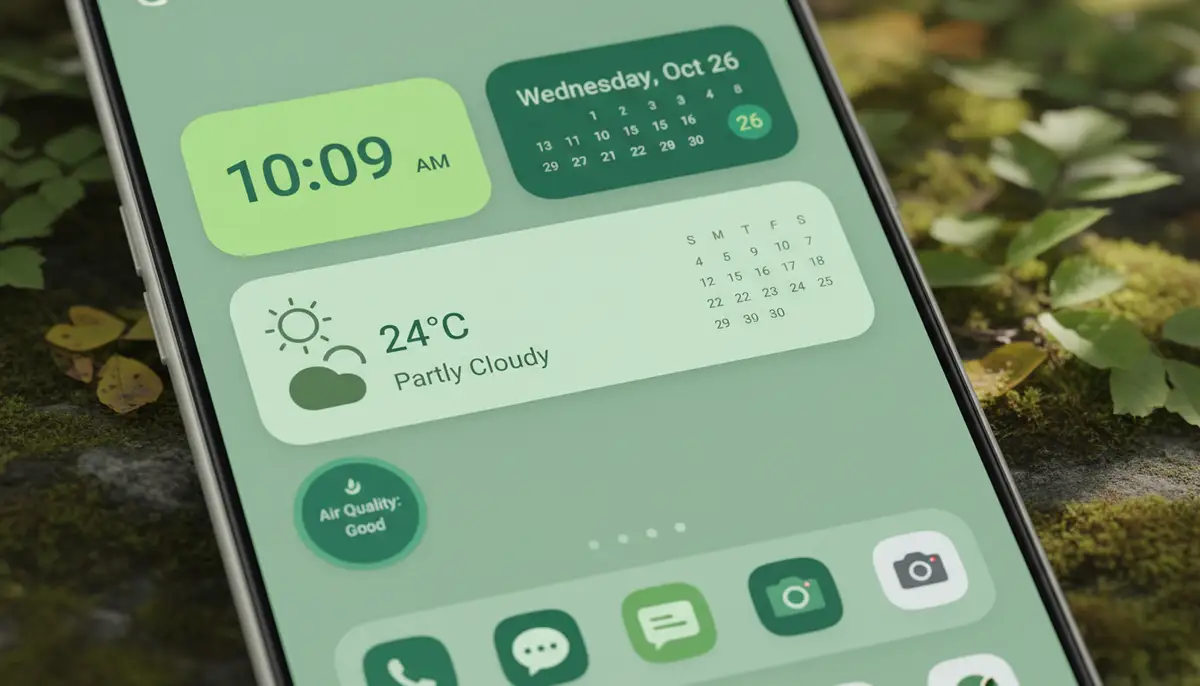
Ultimately, aesthetic green widgets help you create a more intentional and enjoyable digital environment. They transform your device from a generic tool into a personalized assistant and a work of art.
Choosing Your Perfect Shade of Green
The world of green is incredibly diverse. From vibrant neons to muted pastels, there's a shade for every preference. When selecting your aesthetic green widgets, consider the overall mood you want to create. Do you prefer a calming, earthy feel, or something more energetic and modern? Your choice of green will significantly impact your home screen's vibe. This decision is crucial for achieving your desired aesthetic.
- Sage Green: Soft, muted, and sophisticated. Perfect for a calming, minimalist aesthetic.
- Forest Green: Deep, rich, and earthy. Evokes a sense of nature and depth, ideal for a grounded look.
- Mint Green: Light, fresh, and airy. Great for a cheerful, clean, and modern feel.
- Emerald Green: Jewel-toned, vibrant, and luxurious. Adds a touch of elegance and boldness.
- Olive Green: Warm, natural, and rustic. Excellent for a vintage or organic aesthetic.
- Lime Green: Bright, energetic, and playful. Perfect for a bold, modern, and fun statement.
Experiment with different shades. See which ones resonate most with you. You can even combine a few complementary greens for a layered effect. The beauty of aesthetic green widgets is their flexibility. You can always change them later if your preferences evolve.
Finding and Downloading Aesthetic Green Widgets
The good news is that finding aesthetic green widgets in 2025 is easier than ever. A wealth of resources exists for both pre-designed options and tools to create your own. You have many choices at your fingertips. Knowing where to look will save you time and help you achieve your desired aesthetic quickly.
Dedicated Widget Apps and Platforms
Many apps specialize in providing extensive widget libraries. Widgetopia, for instance, offers a massive collection of over 100,000 free homescreen widgets for iPhone, iPad, and Android. You can browse countless aesthetic green widgets or even remix existing designs. Other popular platforms include colorwidgets.app, Aesthetic Widgets, and widgetsmith.app. These competitors also provide a wide array of options. For more specific green widget ideas, check out this comprehensive guide to green widgets ideas.
These apps often feature search functions or categories dedicated to color themes. This makes it simple to filter for green options. You can quickly find what you are looking for. Many also offer premium features for even more advanced customization. For a deep dive into various green styles, you might find inspiration by exploring the best ideas and inspiration for Green widgets aesthetic on Pinterest. Another great resource for specific green widget inspiration is Gase Broussard's board dedicated to green widgets. These platforms are treasure troves of ideas.
Online Marketplaces and Communities
Beyond dedicated apps, online communities and marketplaces are excellent resources. Sites like Pinterest, Reddit, and various design blogs showcase user-created aesthetic green widgets. You can often download widget presets or get inspiration for your own designs. These communities are vibrant and constantly updated. For example, Widget-Club offers aesthetic Green widgets for iPhone, iPad & Android, with hundreds of styles available. You can discover unique and trending designs here. This collective creativity means there's always something new to explore.
Designing Your Own Aesthetic Green Widgets with Widgetopia
While pre-made aesthetic green widgets are fantastic, creating your own offers unparalleled personalization. Widgetopia stands out as a powerful tool for this. It allows you to design widgets from scratch or remix existing ones. You don't need to be a design expert. The interface is intuitive and user-friendly. This means anyone can achieve professional-looking results.
Here’s a simplified process for designing your own aesthetic green widgets using Widgetopia:

- Choose a Widget Type: Select from various functions like clock, calendar, weather, battery, or photo widgets.
- Select Your Green Palette: Widgetopia offers extensive color pickers. Experiment with different shades of green, from light mint to deep forest green, to find your perfect hue.
- Add Elements: Incorporate text, icons, shapes, and images. You can choose green-themed icons or upload your own background images.
- Customize Fonts and Layout: Adjust font styles, sizes, and widget layout to match your aesthetic. Ensure readability and visual balance.
- Preview and Save: See how your aesthetic green widgets will look on your home screen. Make any necessary adjustments before saving and applying.
This hands-on approach ensures that your aesthetic green widgets are truly unique. They will perfectly complement your personal style. The creative possibilities are virtually endless. You can even share your creations with the Widgetopia community.
Integrating Aesthetic Green Widgets into Your Home Screen
Once you have your aesthetic green widgets ready, the next step is integrating them seamlessly into your home screen. This involves thoughtful placement and consideration of your overall layout. A well-organized home screen is both functional and beautiful. You want every element to contribute to a cohesive look. For more visual guidance, watch this helpful video:
.Tips for a Cohesive Layout
- Theme Consistency: Ensure all your aesthetic green widgets, app icons, and wallpaper adhere to a consistent green theme or a complementary color scheme.
- Strategic Placement: Place your most-used widgets in easily accessible areas. Consider grouping related widgets together.
- Vary Sizes and Shapes: Use a mix of small, medium, and large widgets to create visual interest and break up monotony.
- Negative Space: Don't overcrowd your screen. Allow for some empty space to give your design room to breathe and appear clean.
- Matching Wallpapers: Choose a wallpaper that complements your green widgets. This can be a solid green, a nature scene, or an abstract green pattern.
Remember that your home screen is a dynamic space. Feel free to experiment with different arrangements until you find what works best for you. For more ideas on visual elements, explore our guide on aesthetic widget images.
Top Trends in Aesthetic Green Widgets for 2025
The world of digital aesthetics is constantly evolving. In 2025, several exciting trends are shaping how we use and design aesthetic green widgets. Staying updated on these trends can help you keep your device looking fresh and modern. You can incorporate the latest styles into your own customization efforts.
Minimalist Green Widgets
Clean lines, simple fonts, and subtle shades of green are dominating the minimalist trend. These aesthetic green widgets focus on functionality without unnecessary embellishments. They provide information clearly and elegantly. This style is perfect for those who appreciate understated sophistication. It creates a calm and uncluttered digital environment.
Nature-Inspired Themes
Drawing inspiration directly from nature, this trend incorporates organic textures, botanical illustrations, and earthy green tones. Think leaf patterns, forest landscapes, or subtle floral motifs within your aesthetic green widgets. This approach brings a sense of the outdoors to your digital world. It promotes a feeling of peace and connection.
Interactive and Dynamic Green Widgets
Widgets are becoming more interactive. Expect aesthetic green widgets that change based on time of day, weather conditions, or even your activity level. Imagine a green widget that subtly shifts its shade from morning dew to evening forest. This adds a dynamic and engaging element to your home screen. It makes your device feel more alive.

Retro and Vintage Green Aesthetics
Nostalgia is a powerful design force. Retro-inspired aesthetic green widgets feature pixel art, old-school digital clock fonts, and muted, faded green palettes. This trend offers a charming throwback to earlier tech eras. It combines vintage appeal with modern functionality. You can create a unique, timeless look.
Common Challenges and Solutions
While aesthetic green widgets offer immense customization, you might encounter a few hurdles. Knowing how to address them will ensure a smooth setup process. Don't let small issues deter you from achieving your ideal home screen. Here are some common challenges and their solutions:
| Challenge | Solution |
|---|---|
| Widget Not Updating | Ensure the widget app has background refresh enabled. Check app permissions for location or data access. Restart your device if needed. |
| Poor Image Quality | Use high-resolution images for photo widgets. Check the widget app's settings for image compression options. |
| Inconsistent Color Matching | Use a color picker tool to get exact hex codes for your green shades. Apply these consistently across widgets and wallpaper. |
| Widgets Disappearing | Ensure the widget app is not being aggressively optimized by your device's battery saver settings. 'Lock' the app in recent apps if possible. |
| Overwhelmed by Choices | Start small. Pick one or two key aesthetic green widgets to customize first. Build your theme gradually. |
Most challenges have simple fixes. Don't hesitate to consult the app's support documentation or online communities. You can usually find quick answers. The effort is worth the personalized outcome.
Real-World Examples and Inspiration for Aesthetic Green Widgets
Seeing how others have implemented aesthetic green widgets can spark your own creativity. The internet is brimming with examples of stunning green-themed home screens. These can serve as starting points or provide direct inspiration for your setup. You don't have to reinvent the wheel. Learn from others' designs.
- Sage Green Productivity Hub: A minimalist setup with a large sage green calendar widget, a small to-do list widget, and a custom clock. All app icons are in muted green tones.
- Forest Green Nature Retreat: A home screen featuring a deep forest green weather widget, a photo widget displaying a serene forest image, and a battery widget with leaf accents. The wallpaper is a blurred forest scene.
- Mint Green Aesthetic for Social Bees: Bright mint green widgets for social media shortcuts, a news feed widget, and a vibrant green battery indicator. Paired with a playful, abstract green wallpaper.
- Emerald Green Luxury Dashboard: Elegant emerald green clock and date widgets, a finance tracker widget, and custom app icons with gold accents. This creates a sophisticated and high-end look.
Platforms like Pinterest are fantastic for visual inspiration. You can browse countless user-created aesthetic green widgets and home screen setups. Save your favorites and use them as a guide. Seeing these examples can help you visualize your own perfect aesthetic green widgets layout. It makes the design process much easier.
The Future of Aesthetic Green Widgets
What does the future hold for aesthetic green widgets? Expect even more integration with AI and smart home ecosystems. Widgets may become predictive, offering information before you even ask for it, all within your chosen green aesthetic. Augmented reality could also play a role, allowing widgets to interact with your physical environment. The possibilities are truly exciting.
Personalization will continue to be a driving force. Developers will likely offer even more granular control over design elements. This means even more unique aesthetic green widgets tailored to individual preferences. The focus will remain on creating a seamless, beautiful, and highly functional digital experience. Your device will become even more intuitive and visually stunning.
Conclusion: Cultivate Your Digital Sanctuary
Aesthetic green widgets are more than just a trend; they are a powerful tool for digital well-being and personal expression. By embracing the calming, refreshing qualities of green, you can transform your device into a serene and highly functional space. You can reduce clutter and enhance your focus. This guide has provided you with the knowledge and resources to start your own customization journey.

Whether you choose pre-designed options or craft your own unique aesthetic green widgets with tools like Widgetopia, the power to create your ideal digital sanctuary is in your hands. Take the leap and cultivate a home screen that truly reflects you. Ready to explore endless possibilities for your home screen widgets?